Comparisons
Does IPTV Work on Starlink and Rural Internet in Canada? Every Option Compared
Does IPTV work on Starlink in Canada? Yes, and on most rural internet too. Compare Starlink, fixed wireless, DSL and satellite, plus the settings that help.
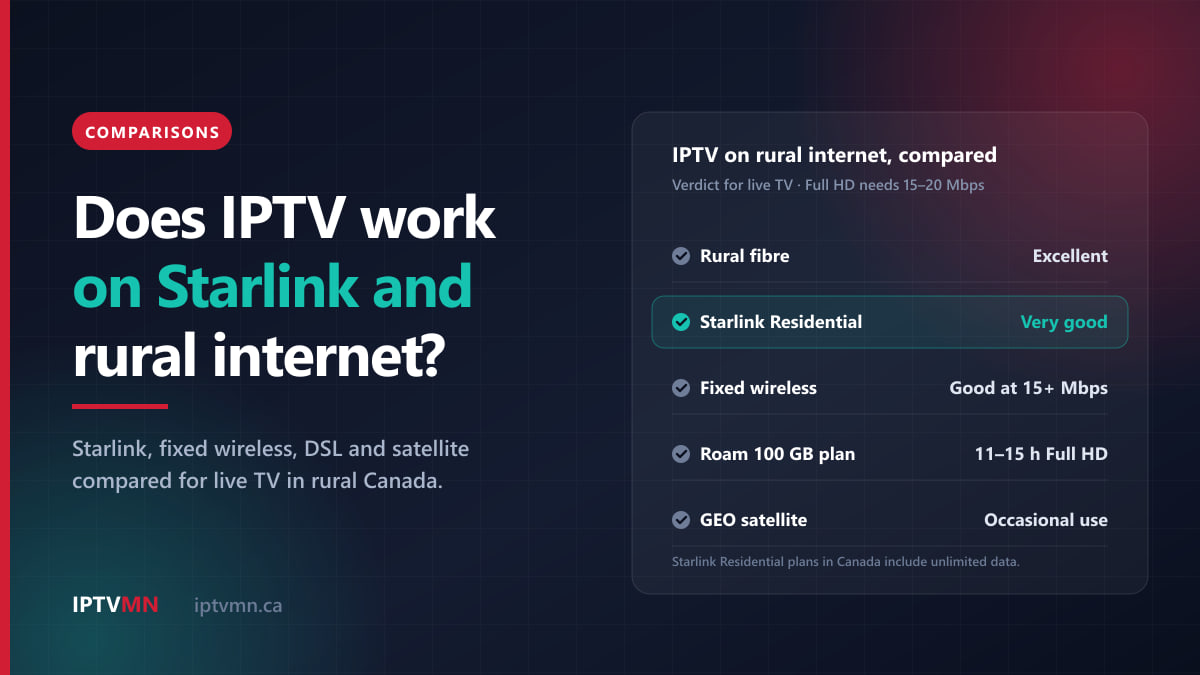
Yes, IPTV works on Starlink, and on most rural internet in Canada. A Starlink residential plan delivers far more speed than a live channel needs, every residential plan includes unlimited data, and the delay of a few dozen milliseconds is too small to notice on a television. Fixed wireless and rural fibre usually work well too.
When rural IPTV goes wrong, the headline speed is rarely the cause. The usual culprits are a monthly data cap, the evening slowdown on a busy tower, and short dropouts when a dish or antenna loses its view. This guide compares every rural connection Canadians actually use, shows which ones suit live television and which do not, and lists the settings that make the difference.
The short answer
- Starlink Residential: works well. All three residential plans sold in Canada include unlimited data, and even the 100 Mbps plan carries two Full HD screens with room to spare.
- Starlink Roam: works, but the 100 GB and 300 GB plans run out quickly. 100 GB is roughly 11 to 15 hours of Full HD.
- Fixed wireless: usually works. Check for a data cap, and test the speed at 8 pm, when the tower is busiest.
- Rural fibre: as good as anything in a city.
- DSL: works if the line holds about 15 Mbps steadily. Many long rural lines do not.
- 5G or LTE home internet: works on an unlimited plan with a strong signal.
- Geostationary satellite internet: plays once a channel starts, but the data allowances make everyday viewing impractical.
- A phone hotspot: fine for one game, not for every evening.
The number to keep in mind is a steady 15 to 20 Mbps per screen for Full HD. Our guide to how much internet speed IPTV needs has the full per-screen figures and the Wi-Fi advice. This article covers what changes once you leave the city.
Does IPTV work on Starlink?
Yes, and Starlink is the connection that has changed the rural answer most. Its satellites orbit a few hundred kilometres up, rather than the 36,000 km of older satellite internet, so the signal makes a short trip. Typical delay on land sits somewhere around 25 to 60 milliseconds, with higher figures in the far north. That is close to many ground connections, and for television it barely matters.
IPTV is a steady download of video, so the speed and the data policy matter far more than the delay. As of autumn 2026, Starlink sells three residential plans in Canada, and all three include unlimited data:
| Starlink plan in Canada | Speed | Data | What it means for IPTV |
|---|---|---|---|
| Residential 100 Mbps | Limited to 100 Mbps, select areas | Unlimited | Two Full HD screens, or one 4K screen, with headroom |
| Residential 200 Mbps | Limited to 200 Mbps, select areas | Unlimited | Three screens comfortably |
| Residential Max | Fastest available, top residential priority | Unlimited | Any household; holds up best at busy times |
| Roam 100 GB or 300 GB | Full speed until the allowance is used, lower priority | 100 or 300 GB at full speed | Weekends at the cottage, not daily viewing |
| Roam Unlimited | Full speed, lower priority | Unlimited | A seasonal cottage or an RV |
Plans and prices vary by address and change often, so check them for your postal code on Starlink’s Canadian site. The point for IPTV is simple: on any residential plan, you do not need to count gigabytes.
What interrupts IPTV on Starlink?
Three things, roughly in order of how often they come up.
- Obstructions. The dish needs a wide, clear view of the sky. A tree, a chimney or a barn roof in that view causes dropouts of a few seconds as satellites pass behind it. An on-demand film hides a short gap behind its long buffer. A live channel plays only a few seconds behind the broadcast, so the picture freezes. The Starlink app has an obstruction check that uses your phone’s camera to map the sky from the spot where the dish will sit. Run it before you mount anything, and again in late spring, once the trees are in full leaf.
- Snow and heavy rain. The standard dish can heat itself to melt snow. In the app, under Settings, then Starlink, then Snow melt, the default is Automatic. Pre-heat is worth switching on before a forecast storm. Very heavy rain or wet snow can still slow the connection for a while.
- Evening congestion. In busy areas, speeds dip in the evening. Residential Max has the highest residential priority and Roam plans have lower priority, which is worth knowing if most of your hockey is watched between 7 pm and 11 pm.
How do I set up Starlink for IPTV?
- Wire the main television. The Gen 3 router in the Standard kit has two Ethernet ports behind a cover. A cable from one of them to the TV or box takes Wi-Fi out of the picture, which fixes more stutters than any other change.
- Choose a device with an Ethernet port for the main screen. Boxes such as the Nvidia Shield and most Android TV devices plug straight in. The Fire TV Stick needs Amazon’s Ethernet adapter, and only Fire OS models such as the 4K Max can run the player, as our comparison of the best device for IPTV explains.
- Leave the VPN off. IPTV MN streams from data centres in Toronto and Montreal. A VPN adds another hop, usually through a busy server somewhere else, and Starlink connections gain nothing from it for television.
Does IPTV work on fixed wireless internet?
Usually, yes. Fixed wireless is a common rural connection across Canada. An antenna on your house or a mast points at a tower, often several kilometres away, and the provider’s network carries the rest. It is not satellite, so the delay is short.
What decides whether IPTV works on it:
- Line of sight to the tower. Trees growing into the path, new buildings and an antenna knocked out of alignment by wind all weaken the signal over time. If your speeds have fallen since installation, ask your provider to check the alignment.
- Shared capacity. Everyone on the tower shares its capacity, so the speed at 8 pm can be well below the speed at noon. That evening figure is the real test, because it is when the big games are on.
- Data caps. Some fixed-wireless plans are unlimited and some are not. Ask before you commit, and ask what happens when the cap is reached: an overage fee, a slower speed, or nothing at all.
- Weather. Heavy rain and snow can weaken the signal on longer links. An antenna mounted high, with a clear path, holds up best.
If your evening speed at the television holds 15 to 20 Mbps, one Full HD screen will play smoothly. Below that, one HD screen is the realistic limit, and live support can set your line to a lighter stream that still looks good on a normal television.
What about rural fibre, DSL and 5G home internet?
Rural fibre
Federal programmes such as the Universal Broadband Fund and the CRTC’s Broadband Fund have paid for fibre along many rural roads in recent years. If fibre has reached your home, IPTV works exactly as it does in a city. The only limits are inside the house: Wi-Fi range, walls and the number of screens watching at once.
DSL
DSL runs over the copper phone line, and its speed falls the further you live from the telephone exchange. A plan sold as “up to 25 Mbps” may hold 10 at the end of a long rural line. Test the real speed at the television before deciding anything. If it holds 15 Mbps or more in the evening, one Full HD screen works. Below that, one HD screen is the ceiling.
5G or LTE home internet
The large carriers and several regional ones sell home internet over the mobile network, with a modem that sits near a window. It works well for IPTV when the signal is strong and the plan is unlimited. Watch for two things: a busy cell site slowing down in the evening, and plans that cap data or slow you down after a set amount. Placing the modem in an upstairs window facing the tower, or adding an outdoor antenna where the provider supports one, often makes a large difference.
Does IPTV work on satellite internet that is not Starlink?
It works, but rarely well enough for everyday viewing. Traditional satellite internet uses geostationary satellites about 36,000 km above the equator. Every request travels up and down that distance, which adds roughly 600 milliseconds of delay that no plan can remove.
For television, that delay mostly shows up at the start. A channel takes a moment longer to open, and flicking through the guide feels sluggish. Once a stream is playing, the delay matters little.
The real limit is data. Geostationary plans in Canada typically come with monthly allowances of a few hundred gigabytes. Full HD uses roughly 6.8 to 9 GB an hour, so a 300 GB allowance covers about 33 to 44 hours of television a month, and that is before anyone in the house browses, updates a phone or joins a video call. That is about an hour a day.
If your only option is geostationary satellite internet, IPTV is fine for the occasional game, ideally in HD. If Starlink, fixed wireless or fibre reaches your address, any of them is a better connection for television. And if there is no usable broadband at all, a satellite TV service, which does not depend on an internet connection, is still the more practical choice.
Rural internet compared: which connection suits IPTV?
| Connection | Data caps | Evening steadiness | Biggest risk for live TV | Verdict for IPTV |
|---|---|---|---|---|
| Rural fibre | Often unlimited | Very steady | Weak Wi-Fi inside the house | Excellent |
| Starlink Residential | Unlimited on every plan | Good; best on Max | Obstructions in the dish’s view | Very good |
| Fixed wireless | Some plans capped | Depends on the tower | A busy tower at 8 pm | Good if it holds 15–20 Mbps |
| 5G or LTE home internet | Varies by plan | Depends on the cell site | Weak signal indoors | Good on an unlimited plan |
| DSL | Varies by plan | Steady but often slow | Too slow far from the exchange | HD only on slow lines |
| Starlink Roam 100 or 300 GB | 100 or 300 GB at full speed | Lower priority | The allowance runs out | Weekends only |
| Geostationary satellite | A few hundred GB | Varies | The allowance and slow channel changes | Occasional use |
Read the table from your address outward. Most rural Canadians can choose between two or three of these, and the right one for television is usually the connection with no cap and the steadiest evening speed, not the one with the biggest number on the box.
How far does a rural data cap go with IPTV?
On an unlimited plan, skip this section. On a capped plan, the conversion that does all the work is Mbps × 0.45 = GB per hour, which gives about 3.6 to 5.4 GB an hour for HD and 6.8 to 9 GB for Full HD.
| Monthly allowance | Hours of HD | Hours of Full HD | Full HD per day, over 30 days |
|---|---|---|---|
| 100 GB | 19–28 | 11–15 | About 20–30 minutes |
| 300 GB | 56–83 | 33–44 | About 1–1.5 hours |
| 500 GB | 93–139 | 56–74 | About 2–2.5 hours |
Those hours assume nobody else uses the connection, which never happens. Phones, laptops, game downloads and automatic updates all draw from the same allowance, so plan on television getting half to two thirds of it at most. The figures are upper estimates, though, and real streams often use a little less.
Three habits stretch a cap the furthest:
- Ask for a lighter stream. Tell live support your connection is capped, and IPTV MN can set your line to a lower-bitrate stream.
- Stop the stream before you turn the TV off. Some boxes keep playing when the screen goes dark, and a channel playing to an empty room uses as much data as one being watched.
- Save 4K for what is filmed in 4K. An evening of 4K uses roughly twice the data of Full HD.
For the full data maths across screens, and the Wi-Fi checks that go with it, see the internet speed guide.
Which settings help IPTV on Starlink and rural internet?
These are the changes that matter most on a rural connection, in order.
- Raise the player’s buffer. A bigger buffer lets the player ride through a dropout of two or three seconds without freezing, in exchange for running a few seconds further behind live. In TiviMate, it is under Settings, then Playback, then Buffer size. Other apps put it in their playback or player settings, and our player apps comparison covers which app suits which device. On Starlink with an occasional obstruction, this one setting often makes the difference.
- Use a cable. Rural homes tend to be long and spread out, and Wi-Fi from a router at one end rarely reaches a basement TV at the other. Ethernet, MoCA over existing coax or a mesh node fixes that.
- Learn the backup server. Every subscription includes a free backup server address in the welcome email, as the IPTV subscription page sets out. If one route struggles, switching takes about thirty seconds.
- Move big downloads overnight. A games console or computer pulling a large update at 7 pm can take most of a rural connection. Most consoles and computers let you schedule updates.
- Check the dish or antenna after storms. Snow on a mast, a branch blown into the path or a dish knocked off level shows up as stutters the next evening.
If you still see stutters after all five, our buffering fixes guide goes through decoder settings, app caches and DNS in the order that helps most often.
Who should not rely on IPTV on rural internet yet?
Some rural homes are better served by something else for now, and it is better to say so plainly.
- Your only connection is capped geostationary satellite. A few hundred gigabytes a month does not stretch to daily television.
- The dish or antenna cannot get a clear view, and there is nowhere else to mount it. Constant short dropouts make live TV frustrating, whatever the player settings.
- Your evening speed at the TV stays below about 15 Mbps, even after wiring the television. That is the point below which no streaming service works well.
- Your only internet is a phone hotspot. It can carry the odd game, but mobile data costs rule it out as the main way to watch.
- Power or internet outages are frequent where you live. IPTV stops when the internet does. If that happens often, a satellite TV service that does not depend on broadband may suit you better.
If none of those apply, IPTV is very likely to work at your address, and the free trial is how to find out for certain.
Four rural households, four answers
These are typical situations rather than individual customers, but each comes up often.
A grain farm outside Saskatoon on Starlink Residential 100 Mbps. Two televisions, curling on one and hockey on the other. Two Full HD screens need 30 to 40 Mbps, comfortably inside the plan. The stutters every few minutes came from a poplar windbreak in the dish’s view, which the obstruction check showed straight away. Moving the dish to the roof peak and raising the player buffer fixed it. They take two connections, $127 for twelve months. See IPTV in Saskatoon.
An outport home in rural Newfoundland on Starlink. One television, and the evening news and the game in Newfoundland time. Starlink’s unlimited data means no counting. Before a forecast nor’easter, they switch the dish’s snow melt to Pre-heat, and they keep the backup server address saved in the app. One connection for twelve months is $77. See IPTV in St. John’s.
A cottage in Manitoba’s Whiteshell on Starlink Roam 100 GB. Summer weekends only. The 100 GB is shared with phones and laptops, so Full HD television gets roughly 6 to 10 hours a month. They watch in HD on a lighter stream, keep the TV for the big games, and buy a single $17 month only when they are at the lake. See IPTV in Winnipeg.
A rural home on Vancouver Island near Victoria, on fixed wireless. The plan is 25 Mbps on paper, but a speed test on the TV at 8 pm shows about 12. That is enough for one HD screen and not for Full HD sport. A cable to the box and a lighter stream from live support make one screen reliable, and the household tests during the trial before buying anything. See IPTV in Victoria.
How do I test IPTV on my rural connection before paying?
The only test that settles it is live television on your own connection, on your own television, at the busiest time of the evening. It takes about an hour.
- Check the view first. On Starlink, run the obstruction check. On fixed wireless or 5G home internet, ask your provider for the signal level, or check the modem’s own status page.
- Run a speed test on the TV or box itself, once in the afternoon and once at 8 pm. Write down both numbers.
- Request a 24-hour free trial. No card is needed. Ask through the free trial page and mention your connection type and speed. If you want to test on a particular evening, such as a big game or a stormy forecast, say so and ask about a longer trial.
- Watch a live game for an hour. Change channels a few times, and check that the channels you care about are on the channels list.
- Measure the data. On a capped plan, note the usage meter in your provider’s app before and after that hour. Now you know your own GB per hour, not an estimate.
- Pick the plan that matches how many screens watch at once. Every plan length is on the pricing page, with one, two or three connections.
Testing first matters for a specific reason. The seven-day refund policy covers a service that does not work properly on your setup after support has tried to fix it, but an internet connection that is simply too slow is listed as a case that does not qualify. The trial is how you find out without risking anything. The coverage page explains how the service reaches every province and territory.
Frequently asked questions
Does IPTV work on Starlink in Canada?
Yes. Every Starlink residential plan sold in Canada includes unlimited data, and even the 100 Mbps plan has far more speed than two Full HD screens need. The main thing to check is that the dish has a clear view of the sky, because obstructions cause short dropouts that live TV shows as freezes.
Will Starlink’s latency affect live TV?
Not in any way you will notice. Starlink’s delay typically sits around 25 to 60 milliseconds on land, which affects how quickly a channel starts rather than how smoothly it plays. Older geostationary satellite internet, at roughly 600 milliseconds, is the kind where delay becomes noticeable when changing channels.
How much data does IPTV use on Starlink?
The same as on any connection: about 3.6 to 5.4 GB an hour in HD and 6.8 to 9 GB an hour in Full HD. On a residential plan the data is unlimited, so it does not matter. On a Roam 100 GB plan, it means roughly 11 to 15 hours of Full HD a month, before anything else in the house uses the connection.
Is fixed wireless good enough for IPTV?
Usually, yes. If the speed at your television holds 15 to 20 Mbps in the evening, one Full HD screen plays smoothly. The two things to check are whether your plan has a data cap and how much the tower slows down around 8 pm, when everyone nearby is online.
Can I use IPTV at the cottage on Starlink Roam?
Yes. The same login works anywhere with internet, so the guide and favourites follow you to the lake. On a capped Roam plan, watch in HD, ask live support for a lighter stream, and stop the stream when nobody is watching. For long summer stays with a lot of television, an unlimited plan makes more sense.
Does bad weather affect IPTV on Starlink?
Sometimes, briefly. Very heavy rain or wet snow can slow the connection for a while, and snow building up on the dish can block it. Leaving snow melt on Automatic, switching to Pre-heat before a storm and raising the player buffer keep most evenings smooth.
Test it on your own rural connection
For most rural Canadian homes in 2026, IPTV works. Starlink Residential and rural fibre handle it with ease, and fixed wireless and 5G home internet do too when the evening speed holds and the plan is unlimited. Capped connections, geostationary satellite and homes with no clear view of the sky are where it struggles, and the answer there is often a lighter stream, a better antenna position or a different connection rather than a faster plan.
The calm way to decide is to measure. Run the obstruction check, test the speed on the TV at 8 pm, and take the free trial during a live game. If it holds up, choose a plan on the pricing page by how many screens really watch at once. If you want a second opinion on your connection first, live chat is open around the clock, and our page on the best IPTV in Canada sets out the standard to hold any provider to, including this one.
Written by the IPTV MN team
We run the servers in Toronto and Montreal and answer the support messages. Everything here comes from what we see on the network and what Canadian members actually ask us. Something unclear or out of date? Tell us and we will fix it.
Keep reading
Comparisons 17 min read
IPTV for Seniors: The Simplest Setup for Parents and Grandparents in 2026
IPTV for seniors works best with one remote, a short channel list and nothing to type. We compare the simplest setups and how family can help from afar.
Read the guide
Comparisons 17 min read
How to Use the TV Guide and Catch-Up TV on IPTV in Canada (2026)
Use IPTV catch-up TV to replay missed shows, compare it with recording, and keep the guide right as western provinces stop changing clocks.
Read the guide
Comparisons 17 min read
How to Watch IPTV on Several TVs at Home: Connections, Plans and Setup
Watching IPTV on multiple TVs comes down to connections. How 1, 2 and 3-connection plans work, which your home needs, and how to set up each TV.
Read the guide