Comparisons
Fire TV Stick vs Android Box vs Smart TV: The Best Device for IPTV in Canada (2026)
The best device for IPTV in Canada depends on your TV. We compare Fire TV Stick, Google TV, Apple TV, boxes and smart TV apps, and the 2026 models to avoid.
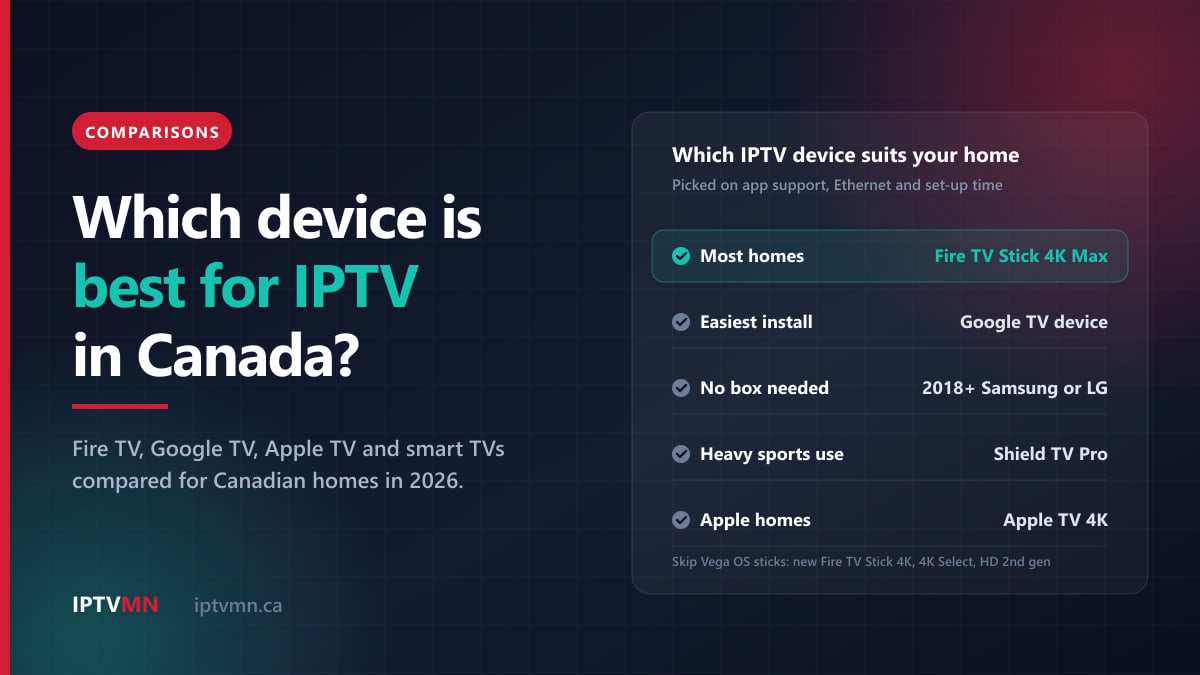
For most Canadian homes, the best device for IPTV is a Fire TV Stick 4K Max or a device running Google TV, such as a Sony, TCL or Hisense Google TV set or the Google TV Streamer. Both install a proper IPTV player in about five minutes, handle 4K well, and cost far less than a premium box. If your television is a Samsung or LG from 2018 or later, you may not need a device at all.
There is one new trap in 2026. Amazon’s newest Fire TV Sticks run a different operating system, Vega OS, which cannot install the player apps IPTV needs. This guide explains which models to buy, which to skip, and when a dedicated box or an Apple TV is worth the extra money.
The short answer
- Most homes: a Fire TV Stick 4K Max (or the 4K Plus), or any device running Google TV or Android TV. Affordable, quick to set up and comfortable in 4K.
- You own a Samsung or LG smart TV from 2018 onwards, or a Hisense or Toshiba on VIDAA: try the TV’s own app store first. No box needed.
- You want the most polished picture and no sideloading: an Apple TV 4K, ideally the Wi-Fi + Ethernet model.
- You watch a lot of live sport on a big screen and want a wired connection, recording or very fast channel changes: a dedicated box such as the Nvidia Shield TV Pro, a Formuler or a BuzzTV.
- You already own a Roku: it works through an M3U player, but it is the most limited option.
- Skip for IPTV: the new third-generation Fire TV Stick 4K, the Fire TV Stick 4K Select and the second-generation Fire TV Stick HD, which all run Vega OS, plus unbranded “fully loaded” Android boxes sold online.
Whatever you choose, test it with the 24-hour free trial before you pay for a plan.
What makes a device good for IPTV?
IPTV MN supplies the channels and runs the servers in Toronto and Montreal. The device in your living room only has to do four jobs well, and they are worth understanding before you stand in a store aisle comparing boxes.
1. Can it install a proper player app? This is the deciding question. A subscription arrives as a login (Xtream Codes) or a playlist link (M3U), and you need a player app to open it. Android TV and Google TV devices get players straight from the Google Play Store. Fire OS sticks install one with Amazon’s Downloader app. Samsung, LG, VIDAA and Apple TV have players in their own stores. If a device cannot install a player, nothing else about it matters. If the two login types are new to you, Xtream Codes vs M3U explains the difference.
2. Is it powerful enough for a large lineup? IPTV MN carries more than 54,000 live channels and a seven-day programme guide, plus 195,000+ movies and 45,000+ shows on demand. Loading that list and its guide is much heavier work than opening a single streaming app. Budget devices with little memory get there, but they scroll and load more slowly, and you notice that every evening.
3. Does it have an Ethernet port? For live sport, a cable to the router beats Wi-Fi almost every time, because live TV has very little buffer to fall back on. Sticks have no Ethernet port and need an adapter. Most boxes and televisions have one built in. If you have to use Wi-Fi, connect to the 5 GHz band rather than 2.4 GHz.
4. Does it decode 4K and HEVC properly? A lot of 4K material is encoded in H.265, also called HEVC. Every current 4K streaming device handles it. Some older televisions lack hardware decoding for it, which is the usual reason a 2016 smart TV stutters on a stream that plays perfectly on a cheap stick.
After that, the remote and software updates decide the rest: the person who watches most should find the remote easy, and a device that still gets updates keeps working with new versions of the player apps.
Which Fire TV Stick works with IPTV in 2026?
The Fire TV Stick is still the device most IPTV MN members start with. The catch is that Amazon is moving its sticks from Fire OS, which is based on Android, to Vega OS, a Linux-based system of its own. Vega OS runs apps from Amazon’s Appstore only. It does not support sideloading or the Downloader app, so you cannot install the player the way our Fire TV Stick setup guide describes, and there is no setting that changes that.
Amazon has told developers that every future Fire TV Stick will run Vega OS. On September 30, 2026 it launched a new, slimmer Fire TV Stick 4K in Canada at a regular price of $79.99, with an introductory price of $39.99. That price is tempting, and the name is only a word away from the 4K Max, but it runs Vega OS.
| Fire TV model | Operating system | Can it install an IPTV player? |
|---|---|---|
| Fire TV Stick 4K Max | Fire OS | Yes |
| Fire TV Stick 4K Plus | Fire OS | Yes |
| Fire TV Cube | Fire OS | Yes |
| Televisions with Fire TV built in | Fire OS | Yes |
| Fire TV Stick HD, 1st generation (squared corners, Wi-Fi 5) | Fire OS | Yes |
| Fire TV Stick 4K, 3rd generation (2026, “4K” printed beside the HDMI plug) | Vega OS | No |
| Fire TV Stick 4K Select | Vega OS | No |
| Fire TV Stick HD, 2nd generation (rounded corners, Wi-Fi 6) | Vega OS | No |
To check a stick you already own, open Settings, then My Fire TV, then About, and look at Software Version. If the number starts with 1 or 2, it is Vega OS. A higher number, such as 7 or 8, means Fire OS, and the setup guide works as written.
If you have just bought a Vega OS stick for IPTV, exchange it for a 4K Max while you are inside the retailer’s return window. If that has passed, keep it for Amazon’s own apps and add a different device for IPTV.
How do the main IPTV devices compare?
Here is every device with a setup guide on this site, side by side. Set-up times are taken from each guide and assume your login email is already in your inbox.
| Device | How the player installs | Ethernet | Set-up time | Best for | Watch out for |
|---|---|---|---|---|---|
| Fire TV Stick 4K Max or 4K Plus | Downloader app (sideloaded) | Adapter needed | About 5 min | Most homes, travel | Buying a Vega OS model by mistake |
| Google TV or Android TV (Sony, TCL, Hisense, Google TV Streamer) | Google Play Store | Streamer and most TVs | About 4 min | The easiest install | Budget sets with little memory |
| Samsung smart TV, 2018 or newer | Samsung store, then a device key | Built into the TV | About 6 min | No extra box | Older models, app activation fees |
| LG smart TV, 2018 or newer | LG Content Store, then a device key | Built into the TV | About 6 min | Magic Remote fans | Sets from 2017 and earlier |
| Hisense or Toshiba on VIDAA | VIDAA store, then a device key | Built into the TV | About 6 min | No extra box | A small app store |
| Apple TV 4K | Apple App Store | Wi-Fi + Ethernet model only | About 4 min | Polished picture, Apple homes | Price |
| Nvidia Shield TV Pro | Google Play Store | Yes | About 4 min | Big screens, heavy sports viewing | Price |
| Formuler or BuzzTV box | Player pre-installed | Yes | 3 to 4 min | Dedicated IPTV, recording | Cost compared with a stick |
| Roku | M3U player channel | Roku Ultra only | About 7 min | Homes that already own one | No Xtream Codes login |
The full set of walkthroughs is on the installation guide page.
Fire TV Stick 4K Max: the best pick for most homes
If you want one device that works on almost any television, the Fire TV Stick 4K Max is it. It plugs straight into an HDMI port, runs IPTV Smarters Pro, and supports Wi-Fi 6E, which helps when the router is two rooms away. Best Buy Canada lists it at $129.99, and other Canadian retailers often sell it for less.
Its biggest advantage is that it travels. Your login works on any internet connection, so the same stick can follow you to the cottage, a hotel or a winter rental in Florida, with your channels, guide and favourites exactly where you left them.
The install takes about five minutes with Amazon’s Downloader app, and the Fire TV setup walkthrough covers each screen.
The honest limitations:
- No Ethernet port. Amazon makes an Ethernet adapter for its Fire TV sticks, and it is worth buying for a main living-room television.
- Limited storage. If the player ever slows down, clear its cache from Settings rather than uninstalling it.
- It is the end of a line. The 4K Max and 4K Plus are the last Fire OS sticks. They still install IPTV players today, but Amazon’s future sticks will not, so think of this as a device for the next few years rather than a long-term platform.
Not the right fit if the idea of a developer setting puts you off, or you would rather install everything from an official store. In that case a Google TV device does the same job with fewer steps.
Google TV and Android TV: the easiest set-up
Google TV and Android TV give you the simplest install of all, because the player you need is already in the Google Play Store. Nothing has to be sideloaded. This covers most Sony televisions, Google TV models from TCL and Hisense, Philips sets, and Google’s own Google TV Streamer. With TiviMate from the Play Store, the Android TV and Google TV guide takes about four minutes.
For a television that is not smart, or one whose built-in apps have stopped updating, the Google TV Streamer is a tidy add-on box: it has the Play Store and an Ethernet port. Google stopped selling the Chromecast with Google TV when the Streamer arrived. If you already own a Chromecast, it still works well, and the Chromecast setup applies. The 4K model has more memory than the HD model and copes better with a large playlist.
A few points worth knowing:
- Hisense makes both kinds of TV. Some Hisense sets run Google TV and some run VIDAA. Check the home screen before following a guide.
- Budget sets are slower. Entry-level Google TV televisions ship with modest processors and memory, so the guide may take longer to load. They still work; they are just less snappy than a good stick.
- Some players have paid tiers. TiviMate, for example, sells a premium version through its developer. That is separate from your IPTV MN subscription, and free alternatives such as IPTV Smarters Pro work fine.
Do you need a box if you have a smart TV?
Often, no. If your television is a reasonably recent Samsung, LG or VIDAA set, it can run a player app on its own:
- Samsung (Tizen), 2018 onwards: install IBO Player or Smarters Player Lite from the Samsung store. See the Samsung smart TV guide.
- LG (webOS), 2018 onwards: install IPTV Smarters Pro from the LG Content Store. See the LG smart TV guide.
- Hisense and Toshiba on VIDAA: install IBO Player Pro from the VIDAA store. See the VIDAA TV guide.
On these TVs you do not type a long password with the remote. The app shows a device key, you send a photo of it to live support, and the team loads your playlist onto that key within a few minutes.
The advantages are one remote, no extra input to switch to, and no extra plug behind the set. For brand-by-brand detail, see our guide to IPTV on a smart TV without a box.
The limitations are just as real:
- Age matters. Samsung sets from before 2018 and LG sets from 2017 and earlier are better served by a stick plugged into the HDMI port.
- Television software ages faster than the screen. A set can lose app support while the panel still looks great. When that happens, a $130 stick gives it a second life.
- Activation fees. Some TV player apps charge a small activation fee to the app’s developer after a trial period. It is separate from your subscription, but worth knowing before you start.
Is Apple TV 4K worth it for IPTV?
Apple TV gives the most polished experience of any device here. The player, Smarters Player Lite, comes from the official App Store, so there is no sideloading, and the install takes about four minutes with the Apple TV guide.
The cost is the catch. Apple raised Canadian prices in 2026, and Apple’s Canadian store now lists the Apple TV 4K at $279 for the Wi-Fi model with 64 GB and $349 for the Wi-Fi + Ethernet model with 128 GB. Only the more expensive one has an Ethernet port, which is the one to choose for a main television that shows live sport.
Two settings make a noticeable difference:
- Set Video Output to 4K SDR at 60 Hz for the smoothest live sport.
- Turn off Match Dynamic Range if the screen goes black for a moment each time you change channel.
Worth it if your household already lives in Apple’s world, you want no sideloading at all, and you plan to keep the device for years. Not worth it if you are equipping several televisions on a budget: three Apple TVs cost $837 to $1,047, and three Fire TV Sticks 4K Max cost far less.
Are Android boxes like the Nvidia Shield worth the money?
A dedicated box makes sense when the television is on all evening, the screen is large, and live sport is the main event. It brings an Ethernet port, more memory for very large playlists, and in some cases recording.
Nvidia Shield TV Pro. Nvidia’s flagship Android TV box, with the Play Store built in. With TiviMate set to hardware decoding, channel changes feel close to instant; the Nvidia Shield guide covers the settings. Nvidia raised the Shield TV Pro’s price in October 2026 and discontinued the base Shield TV, so check current Canadian stock and pricing before you plan around one.
Formuler (Z11, Z10 and Z8). Built for IPTV from the start. The MYTVOnline 3 player is pre-installed, so set-up is just adding your Xtream Codes details as a portal, about three minutes with the Formuler guide. Formuler boxes can also record live TV to a USB drive plugged into the back.
BuzzTV (X5, XRS and Stick). These ship with their own BuzzTV Player, which accepts Xtream Codes directly, and also include the Play Store if you prefer TiviMate. The remote has a built-in air mouse. The BuzzTV guide takes about four minutes.
Is a box better than a Fire TV Stick for IPTV? For a busy main television, usually yes: the wired connection and extra memory show during a big game. For a bedroom TV or a casual viewer, no. A stick does the same job for a fraction of the price, and that money is better spent on a longer plan.
Which Android boxes should you avoid?
Avoid unbranded Android boxes sold online as “fully loaded”, “unlocked” or “free TV for life”. In June 2025 the FBI issued a public warning about compromised home devices, naming TV streaming devices among them. Some arrived with malicious software already installed, and others picked it up through updates or apps. Infected devices were used to route criminals’ traffic through owners’ home internet connections.
The warning signs it lists are useful for any purchase: a brand you do not recognise, instructions to disable Google Play Protect, and advertising that promises unlocked or free content. The safer path is simple: buy a known brand with the Google Play Store built in, or one of the devices above, from a Canadian retailer you can return it to.
There is also a legal side. The technology itself is legal; it is the same technology Bell and Rogers use for their own television services. What matters is the licensing of the content a service carries, not the box. IPTV MN supplies network access and reseller services and does not host, record or broadcast any media. Subscribers are responsible for making sure their own use complies with the Copyright Act and the Broadcasting Act. The full position is in our disclaimer, and what is IPTV explains how the technology works.
Can you use a Roku or a Windows PC for IPTV?
Roku: yes, with limits. Roku keeps its channel store closed, so you add an M3U player channel from the official Roku store and pair it with your M3U link from a phone or laptop. The Roku guide takes about seven minutes. Roku does not support the Xtream Codes login, so features like the guide depend on what that player offers, and a Roku Ultra handles 4K far better than the basic Express. If you already own a Roku, try it during the trial. If it frustrates you, a Fire TV Stick 4K Max or a Google TV Streamer in the same HDMI port is the upgrade.
Windows: yes, and it is the fastest test. VLC is free, and pasting your M3U link into “Open Network Stream” loads your channel list straight away. For a proper TV-style guide and catch-up, use IPTV Smarters for Windows with your Xtream Codes details. The Windows PC guide covers both. A laptop also makes a handy second screen when two games are on at once.
Which device fits your home? Five Canadian examples
Snowbirds from Ottawa. One television at home, a rental in Florida from January to March. Pick: a Fire TV Stick 4K Max. It goes in the suitcase, and the same login, guide and favourites work on the rental’s Wi-Fi. One connection covers them. See IPTV in Ottawa.
A hockey family in Calgary with three televisions. The basement TV shows every Flames game; the kids watch in two bedrooms. Pick: a Shield TV Pro or Google TV Streamer, wired, in the basement, plus a Fire TV Stick 4K Max in each bedroom, on a three-connection plan so all three can play at once. See IPTV in Calgary.
Grandparents in Halifax with a 2021 Samsung. They want one remote and nothing new to learn. Pick: no box. Their daughter installs IBO Player, photographs the device key and sends it to live support. The channels appear on the next restart. See IPTV in Halifax.
A student in Montreal with an old TV and a laptop. RDS and TVA Sports matter more than 4K. Pick: the laptop for the trial, then a Fire TV Stick 4K Max for the TV. A single $17 month during the playoffs, nothing when it is not needed. The French channels are on the channels list. See IPTV in Montreal.
A couple in a Vancouver condo who use iPhones. One large television, and no interest in developer settings. Pick: the Apple TV 4K Wi-Fi + Ethernet model, wired to the router in the media cabinet. See IPTV in Vancouver.
How many devices can one subscription use?
You can install the app on as many devices as you like. A connection is one screen watching at a time, so a one-connection plan plays on one screen at once, whichever device that is. Plans come with one, two or three connections:
- 1 connection: $17 for one month, or $77 for 12 months ($6.42 a month).
- 2 connections: $27 for one month, or $127 for 12 months.
- 3 connections: $39 for one month, or $178 for 12 months.
The 3- and 6-month options are on the pricing page. Every plan includes the same channels, on-demand library, catch-up and programme guide, so the only question is how many people watch at the same time.
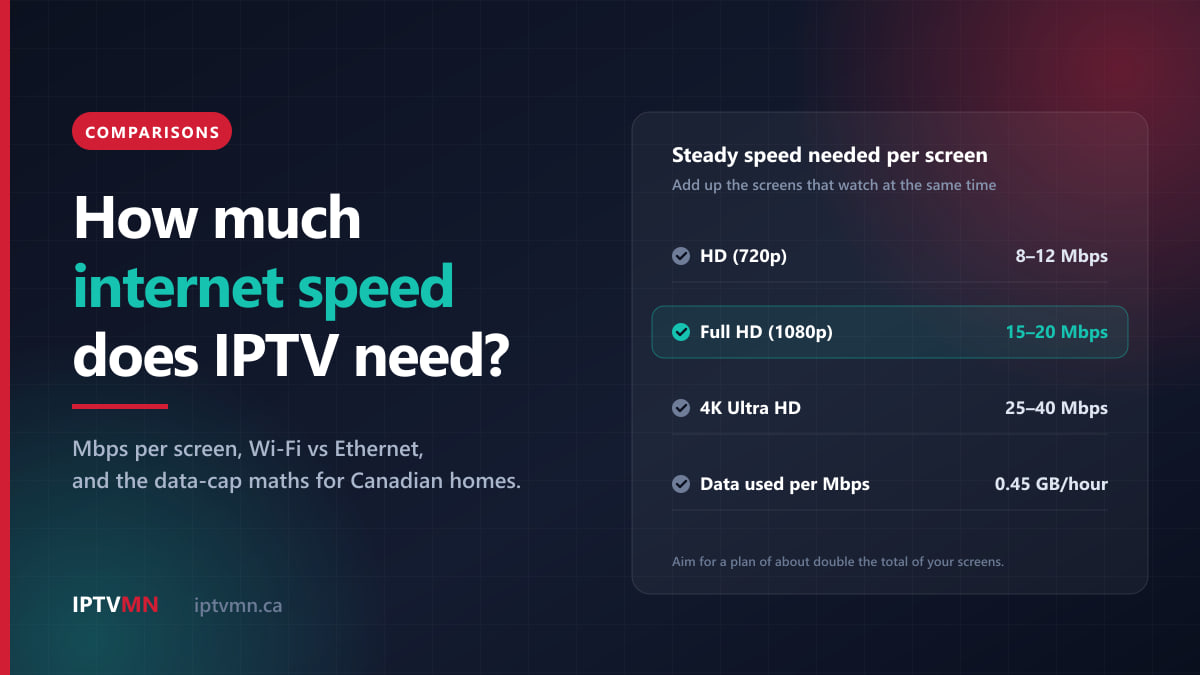
Each extra screen also needs its own share of your internet: roughly 8 to 12 Mbps for HD, 15 to 20 Mbps for Full HD and 25 to 40 Mbps for 4K. Our guide to how much internet speed IPTV needs does the maths for multi-screen homes. If one device stutters while the others are fine, its Wi-Fi connection is often the cause rather than the device itself, and the buffering fixes guide goes through the checks in order.
Frequently asked questions
What is the best device for IPTV in Canada?
For most homes, a Fire TV Stick 4K Max or a Google TV device such as the Google TV Streamer. Both install a good player app in minutes and handle 4K comfortably. If you own a Samsung or LG smart TV from 2018 or later, try the TV’s own app first, because you may not need a device at all.
Is a Fire TV Stick or an Android box better for IPTV?
A Fire TV Stick 4K Max is the better value for most televisions and the better choice for travel. A dedicated Android box such as the Nvidia Shield TV Pro or a Formuler is better for a busy main TV, because it has an Ethernet port, more memory and, on Formuler, recording to USB. The difference shows most during long evenings of live sport.
Can I use the new Fire TV Stick 4K for IPTV?
Not the third-generation model launched in 2026. It runs Vega OS, which does not allow the Downloader app or sideloading, so the IPTV player cannot be installed. The Fire TV Stick 4K Max, the 4K Plus and the Fire TV Cube still run Fire OS and can install the player as usual.
Do I need a box if I have a smart TV?
Usually not, if the TV is a Samsung or LG from 2018 onwards, a VIDAA set, or a Google TV or Android TV model. Those can install a player from their own store. Older sets, and TVs whose apps have stopped updating, are better served by a stick in the HDMI port.
Does the device affect picture quality?
Yes, within limits. A capable device decodes 4K and HEVC smoothly, changes channels faster and handles the guide without lag, while an older or underpowered one may stutter. No device can turn an HD broadcast into true 4K, though, and a wired connection often improves the picture more than a new device would.
Can I use one subscription on several devices?
Yes. You can install the app on as many devices as you like, but the number of screens playing at the same time is set by your plan: one, two or three connections. A one-connection plan works on your Fire TV Stick or your phone, just not on both at once.
The verdict: start with what you already own
The best IPTV device is often the one already connected to your television. If it is a recent Samsung, LG, VIDAA or Google TV set, try its own app first. If it is older, or not smart at all, a Fire TV Stick 4K Max is the best all-round pick, as long as you avoid the Vega OS models, and a Google TV device is the easiest. Spend more on an Apple TV or a Shield only when your household will actually feel the difference.
The low-risk way to decide is to request the free 24-hour trial, install it on the device you have, and watch a game at 8 pm. If it holds up, choose a plan on the pricing page and pay by Interac e-Transfer; your login arrives by email, usually within ten minutes. The refund policy gives you seven days if something cannot be fixed on your setup, and our page on the best IPTV in Canada sets out what to expect from any provider, including us.
Written by the IPTV MN team
We run the servers in Toronto and Montreal and answer the support messages. Everything here comes from what we see on the network and what Canadian members actually ask us. Something unclear or out of date? Tell us and we will fix it.
Keep reading
Comparisons 17 min read
How Much Internet Speed Does IPTV Need in Canada? A Practical 2026 Guide
How much internet speed IPTV needs in Canada: Mbps per screen for HD, Full HD and 4K, Wi-Fi vs Ethernet, and the data-cap maths to do before you pay.
Read the guide
Comparisons 14 min read
Is IPTV the Best Choice in Canada? An Honest Verdict for 2026
Is IPTV the best way to watch TV in Canada? We weigh it against cable, satellite and streaming apps on cost, sports, quality and reliability.
Read the guide
Comparisons 7 min read
IPTV vs Cable in Canada: What You Really Pay Over One Year
A line-by-line comparison of a Canadian cable bill against an IPTV subscription. Equipment rental, promo cliffs, sports add-ons and the real annual total.
Read the guide