Comparisons
IPTV Channel Not Loading? How to Find the Cause and Fix It (2026)
IPTV channel not loading? Check whether it is one channel or all of them, then use the matching fix: playlist refresh, decoder, connections or backup server.
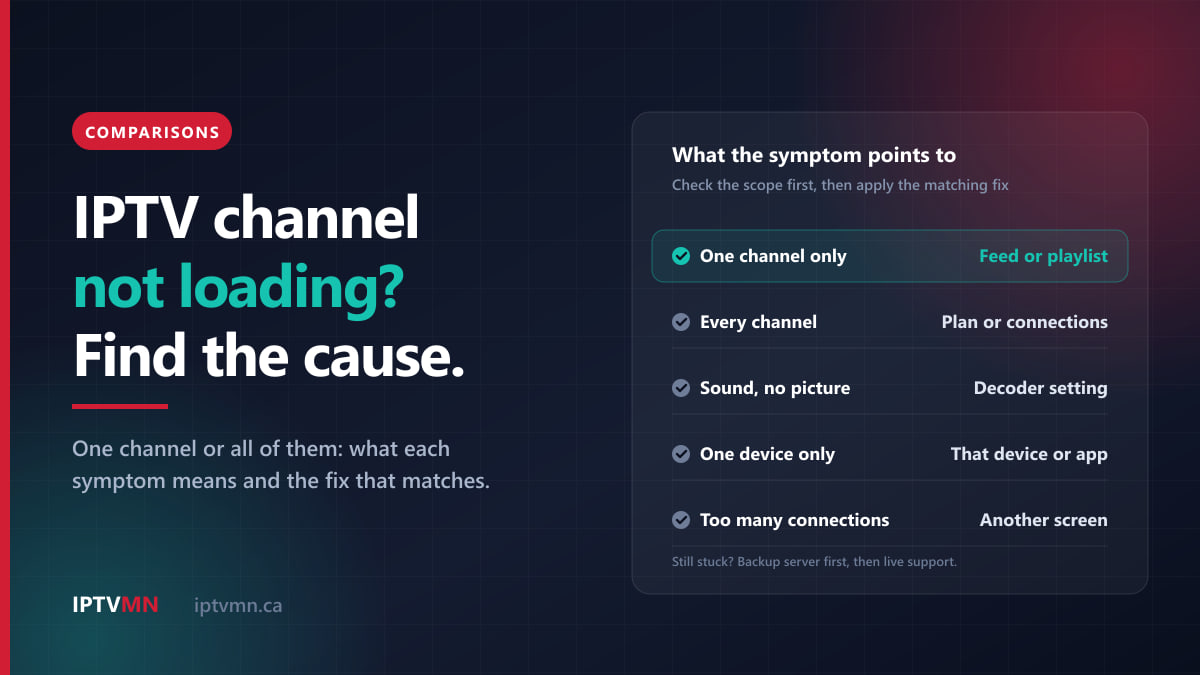
When an IPTV channel is not loading, the right fix depends on one question: is it one channel, or all of them? A single channel that shows a black screen or “stream unavailable” usually comes down to the channel’s feed, an out-of-date channel list inside your app, or a decoder setting. When every channel fails at once, the cause is almost always your account, your connection limit, the server route or your home network.
So spend a minute working out which case you are in before you change anything. This guide sorts the symptoms, explains what each one points to, and gives the fixes in the order that solves them most often. If your channels do open but then stutter and freeze, that is a different problem, and the buffering fixes guide covers it step by step.
The short answer
- One channel will not load and the rest are fine: back out, wait 15 seconds and reopen it, then refresh the playlist in your app. If it is still dead, switch to the backup server or tell live support the channel name.
- Sound but no picture, or a black or green screen: switch the decoder between Hardware and Software in the player’s settings. On an Apple TV, try turning off Match Dynamic Range.
- No channels load at all: check your plan’s expiry date, make sure no other screen is using your connection, then try the backup server address from your welcome email.
- It plays on your phone but not on the TV: the fault is in that device. Clear the app’s cache, update the app and restart the device.
- Still stuck after ten minutes: message live support with the channel, the device and a photo of the screen.
Is it one channel, a few, or all of them?
This is the most useful minute you will spend. Run four quick checks:
- Open three channels from different groups, for example a Canadian news channel, a sports channel and an international one.
- Play a movie from the on-demand library. Live TV and on-demand come through the same login, so if a movie plays, your account and your internet connection are working.
- Try the same channel on another device, such as your phone with the same login. On a one-connection plan, stop the TV first, or the phone will be refused.
- Note the exact message, or take a photo of the screen. A spinning circle, “stream unavailable”, “too many connections” and a black screen with sound all point in different directions.
| What you find | What it points to | Where to start |
|---|---|---|
| One channel fails, everything else plays | That channel’s feed, or a stale channel list | Refresh the playlist, then the backup server |
| A whole group fails, such as one country | A route or source problem for that group | Backup server, then live support |
| Every channel fails, movies too | Account, connection limit or network | Expiry date, other screens, router |
| Fails on one device, plays on another | That device or its app | Cache, app update, restart |
A problem on every channel is nearly always local or account-related, so the fix is in your hands. A problem on one channel or a handful is more often on the server side. That is the case where IPTV MN’s team can check the feed and move you to a different server.
What does each IPTV symptom usually mean?
The wording differs from app to app, but the symptoms fall into a few families. Find yours in the left-hand column.
| Symptom | Most likely cause | First fix |
|---|---|---|
| Spinning circle, then nothing | Feed not responding, or a stale list | Reopen after 15 seconds, then refresh the playlist |
| “Stream unavailable” on one channel | Channel down at source, or its address changed | Refresh the playlist, then the backup server |
| Black screen with sound | Decoder cannot draw that video format | Switch between Hardware and Software decoding |
| Green, frozen or blocky picture with sound | Decoder mismatch on that channel | Switch the decoder, then reopen |
| Black for a second or two, then plays | TV changing frame rate or HDR mode | Normal; turn matching off if it bothers you |
| Plays a few seconds, then stops | Another screen took the connection, or weak Wi-Fi | Check other devices, then the network |
| “Too many connections” | Every connection on your plan is in use | Close the app on the other screen |
| Every channel fails with “expired” or “invalid” | Plan has ended, or login details are wrong | Check the expiry date and the login |
Some apps show a number instead of a sentence. As a rough guide, a 404 means the address your app holds for that channel no longer exists, which usually points to an out-of-date channel list. A 401 or 403 means the server refused the request, which is usually an account matter: an ended plan, a mistyped password or too many connections at once.
How do I fix a single channel that will not load?
Work down this list and stop as soon as the channel plays.
1. Back out and reopen it after 15 seconds. Live feeds occasionally drop for a moment, often when a broadcaster switches programmes at the top of the hour. If a channel has not started within 15 seconds, staring at the spinner rarely helps. Going back to the list and opening it again often does.
2. Check the guide for that channel. Some channels in a large lineup only carry pictures while something is scheduled, such as event feeds for a pay-per-view card. Outside those hours they can show a holding slate or nothing at all. If the guide shows no programme, try again closer to the start time.
3. Refresh the playlist. Your app keeps its own copy of the channel list. When channels are added, moved or renumbered on the server, an old copy can point at an address that no longer answers. In TiviMate, the update option sits on your playlist under Settings, then Playlists. In IPTV Smarters Pro, use the refresh or reload option on the home screen. The exact wording changes between app versions. Closing the app completely and opening it again also makes most players fetch a fresh list.
4. Try another entry for the same channel. Large lineups often list a popular channel more than once, for example in HD and in 4K, or in a sports group and a regional group. If yours does, open the other entry. When one version plays and the other does not, the fault is in that single feed, and that is worth reporting.
5. Switch to the backup server. Every IPTV MN subscription includes a free backup server address in the welcome email, as the IPTV subscription page sets out. In your app, edit the playlist or portal, replace the server address with the backup one, save and reload. It takes about thirty seconds and routes around a problem between one server and your internet provider.
6. Tell live support which channel it is. Give the channel name, the group it sits in and roughly when it stopped. A single dead channel is usually something only the server side can fix, and the team can move you to a different server, usually in under two minutes.
If the channel is missing from the list rather than refusing to play, it may be in a hidden group or behind a PIN lock. In TiviMate, look under Settings, then Playlists, then Channel groups. Our guide to parental controls on IPTV explains where those locks live in each app. It is also worth searching the channels list to confirm the channel is in the lineup at all.
Why does a channel play sound but show a black screen?
When you can hear the commentary but see nothing, the stream is arriving. Your device just is not drawing the picture. That narrows the cause to the decoder, the video format or the link between the box and the television.
Switch the decoder. Every serious player has a setting for how video is decoded. Hardware decoding uses the device’s dedicated video chip and is the right default on modern hardware. Software decoding makes the main processor do the work. A channel that shows black, green or blocky video with one setting often plays perfectly with the other.
- TiviMate: Settings, then Playback, then Decoder.
- IPTV Smarters: Settings, then Player Settings.
- IPTV Smarters Pro can also hand a channel to an external player such as VLC, which is a quick test when one channel misbehaves.
Change the setting, reopen the channel, and if it fixes one channel but makes others worse, set it back. The Android TV and Google TV guide shows where TiviMate keeps its settings.
Check for 4K on older hardware. 4K channels and events are usually encoded in HEVC, a newer and more efficient video format. Older streaming sticks and some older televisions cannot decode it, or struggle to. If only the 4K channels go black, open the HD version of the same channel. A modern device with full 4K support is the long-term fix.
Turn off format matching on an Apple TV. Under Settings, then Video and Audio, then Match Content, an Apple TV can switch your television’s output to suit each programme. Apple’s own support page on Match Content warns that you might see a blank screen or flickering while the TV switches formats. If channels go black every time you change them, turn Match Dynamic Range off, as the Apple TV setup guide recommends. Android TV and Google TV devices have a similar frame-rate option. A second or two of black when a channel starts is the TV re-syncing, not a fault.
Reseat the HDMI cable. If the picture also drops out in the device’s own menus, the problem is the cable or the port, not IPTV. Unplug the cable at both ends, plug it back in firmly, and try a different HDMI input on the television.
Why have all my IPTV channels stopped loading?
When nothing plays, live channels and movies alike, check these four things in order. Between them they cover nearly every case.
1. Has your plan ended? IPTV MN plans do not renew automatically. Nothing is ever charged without you asking, but it also means the channels stop on the last day of the period you paid for. Most player apps show the expiry date in the account or playlist details. If it has passed, choose a plan on the pricing page and pay by Interac e-Transfer from your bank app; the login is emailed the moment the transfer lands, usually in under ten minutes.
2. Is another screen using your connection? A connection means one stream playing at a time, so a one-connection plan plays on one screen, a two-connection plan on two, and so on. A phone still playing in a pocket, a bedroom TV switched off without closing the app, or a tablet at the cottage all count while they stream. Close the app on the other device, wait a minute and try again. If your household regularly needs more screens at once, one connection costs $18 for a month or $78 for a year, two cost $28 or $128, and three cost $40 or $179. Our guide to watching IPTV on several TVs at home explains how to count what you actually need.
3. Is the server route the problem? Switch to the backup server address. If channels play on the backup, the problem was between the main server and your internet provider. Mention it to support either way, because it helps them spot a route that needs attention.
4. Is your home network working? Open a website or a video app on the same device. If that is slow too, unplug the router for a full sixty seconds and plug it back in. Turn off any VPN on the device: IPTV MN’s servers are in Toronto and Montreal, so from inside Canada a VPN only adds distance. Finally, check that the device’s date and time are set automatically. A clock that is wrong can make secure connections fail, and it puts the programme guide in the wrong hour.
If the app says the login is invalid, the cause is usually one wrong character. Copy the details from your welcome email rather than typing them, and check the port number after the colon at the end of the server address.
Why does IPTV work on my phone but not on my TV?
If the same login plays on your phone, your account and the server are fine. The fault sits with the TV device or its app, and these fixes are in order of how often they help.
- Clear the app cache. Player apps build up guide data and images, which can slow a Fire TV Stick with little free storage. On Fire TV, go to Settings, then Applications, then Manage Installed Applications, choose your player and press Clear Cache. Do not press Clear Data, which deletes your login.
- Update the player app. Use the store it came from or, on a Fire TV Stick, the download address in your welcome email, as the Fire TV Stick guide explains.
- Restart the device properly. On a Fire TV, hold Select and Play/Pause on the remote together for about five seconds. On other devices, unplug the power for a minute. A box that has run for months without a restart benefits most.
- Check that device’s network. The TV may sit on the crowded 2.4 GHz Wi-Fi band while your phone is on 5 GHz, or a VPN app may be running on the box. An Ethernet cable rules the network out in one move.
Smart TV apps that use a device key need one extra check. On Samsung, LG and VIDAA televisions, players such as IBO Player load your playlist onto a device key shown on screen. Some of these apps charge their own small activation fee to the developer after a trial period, separate from your IPTV subscription. If every channel stopped at once on a TV that uses one, look for an activation message in the app before anything else. A new television also needs its key loaded again, which live support does for you, as the Samsung smart TV guide and the LG smart TV guide describe.
If one app keeps causing trouble, changing app is a legitimate fix. Your login is not tied to any player, and our comparison of IPTV player apps sets out which one suits which device.
One case cannot be fixed with settings. Amazon’s newest Fire TV Sticks run Vega OS, which cannot install IPTV players at all. If yours has no option to install apps from unknown sources, the installation guides list the devices that do work.
When is the problem not something you can fix?
An honest troubleshooting guide has to say where its limits are.
- A channel that is down at its source. When a broadcaster’s own feed is off the air, no setting, server switch or support team can make it play until it returns. Support can at least tell you whether it is a known problem, so you stop trying fixes that cannot work.
- A channel that is not in the lineup. No app setting adds one. The channels list shows what is carried, so check it before you subscribe, not after.
- An internet outage at home. IPTV stops when your internet stops, exactly as Fibe TV, Ignite TV or any streaming app does. For an important game, the same login works on a phone over mobile data, but watch your data allowance.
- Streams that open but then stutter. That is buffering, not loading, and the fixes are different: Ethernet, the 5 GHz band and what else is using your connection. The buffering guide works through them in order.
What should I send live support?
Live support is a live chat that answers 24 hours a day, 7 days a week, and you can also email help@supportiptv.ca. A message with these five details usually gets solved in one reply:
- The channel name and its group, or “every channel”.
- The device and the app, for example “Fire TV Stick 4K Max, IPTV Smarters Pro”.
- Wi-Fi or Ethernet.
- When it started, and whether you have already tried the backup server.
- A photo of the screen, with any error message visible.
The first item matters most. “One channel” versus “all channels” tells the team in seconds whether to look at your setup or move you to a different server. The help centre also lists six quick fixes for the problems that come up most often.
Three common situations, and what fixed each one
A Saturday hockey game in Calgary. Take a household watching a game on Sportsnet West through an Android box bought several years ago. The commentary plays, but the screen stays black; every other channel works. That is the decoder, not the channel. Switching TiviMate’s decoder from Hardware to Software brings the picture back. See IPTV in Calgary.
A two-TV home in Halifax at 8 pm. The living-room TV shows “too many connections” on a two-connection plan. Upstairs, a teenager’s tablet is still playing a movie with the sound off, and the bedroom TV is on too. Closing the app on the tablet frees a connection, and the living room is watching again within a minute. See IPTV in Halifax.
Grandparents in Mississauga and one home channel. PTC Punjabi shows “stream unavailable” for an evening while everything else plays. The backup server does not help, because the problem is the feed itself. Their son sends live support the channel name and the time it stopped, the team confirms it is a source problem, and the channel plays again once the feed returns. See IPTV in Mississauga.
Frequently asked questions
Why does only one IPTV channel not load?
Usually because that channel’s feed is down, or because your app is holding an out-of-date channel list. Back out and reopen it, refresh the playlist, then try the backup server. If it still will not play, tell live support the channel name so the team can check the feed.
Why do I get sound but no picture on IPTV?
The stream is arriving, but your device is not decoding the video. Switch the player’s decoder between Hardware and Software and reopen the channel. On an Apple TV, turning off Match Dynamic Range can also cure a black screen that appears when you change channels.
Why have all my IPTV channels stopped working at once?
The most common causes are an ended plan, another screen using your connection, a problem on the server route or a home network fault. Check the expiry date, close the app on other devices, try the backup server address, then restart your router.
Does reinstalling the app fix channels that will not load?
It is rarely the first thing to try. Clearing the app cache and refreshing the playlist fix the same problems without deleting anything. Reinstalling wipes your login, your favourites and your hidden groups, because those are saved inside the app, not on your account.
How long should I wait before reporting a channel that is down?
Give it about ten minutes and the fixes in this guide. If the channel still will not play after a playlist refresh and the backup server, message live support straight away with the channel name and the time it stopped. Reporting early helps the team spot a feed problem sooner.
Will a VPN help a channel that will not load?
Not usually inside Canada. IPTV MN’s servers are in Toronto and Montreal, so a VPN sends your traffic further away before it comes back, which can make loading slower. If a VPN is running and channels fail, turn it off and test again.
Start with the scope, then the fix
Most “IPTV channel not loading” problems are solved in a few minutes once you know which kind you have. One channel points to the feed, the playlist or the backup server. Every channel points to the plan, the connection limit or the network. Sound without a picture points to the decoder. And if it plays on one device but not another, the answer is on that device.
If you are still choosing a service, the fairest test is your own: request the 24-hour free trial, which needs no card, open the channels you care about at 8 pm, and see how quickly support answers a question. When you are ready, the pricing page lists every plan, the refund policy gives you seven days if something cannot be fixed on your setup, and our page on the best IPTV in Canada sets out what to expect from any provider, including us.
Written by the IPTV MN team
We run the servers in Toronto and Montreal and answer the support messages. Everything here comes from what we see on the network and what Canadian members actually ask us. Something unclear or out of date? Tell us and we will fix it.
Keep reading
Comparisons 15 min read
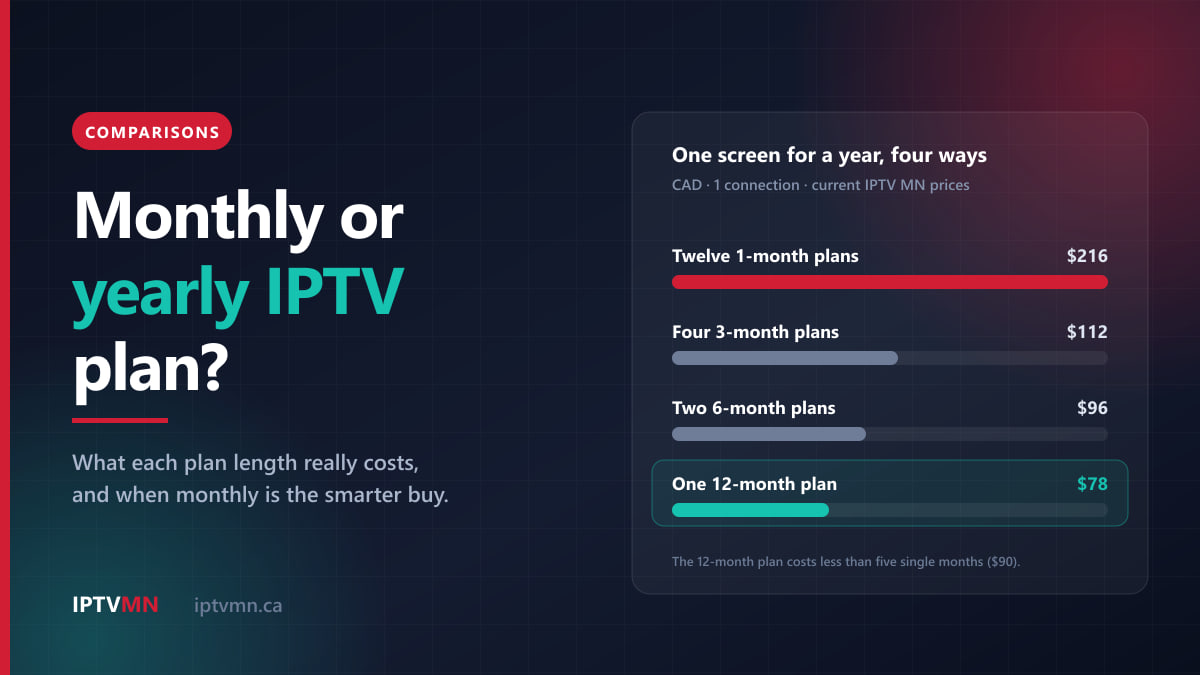
Monthly or Yearly IPTV Plan? How to Choose, With the Real Numbers (2026)
Monthly or yearly IPTV plan? See what each plan length really costs, the month when the yearly plan pays for itself, and when monthly is the smarter buy.
Read the guide
Comparisons 16 min read
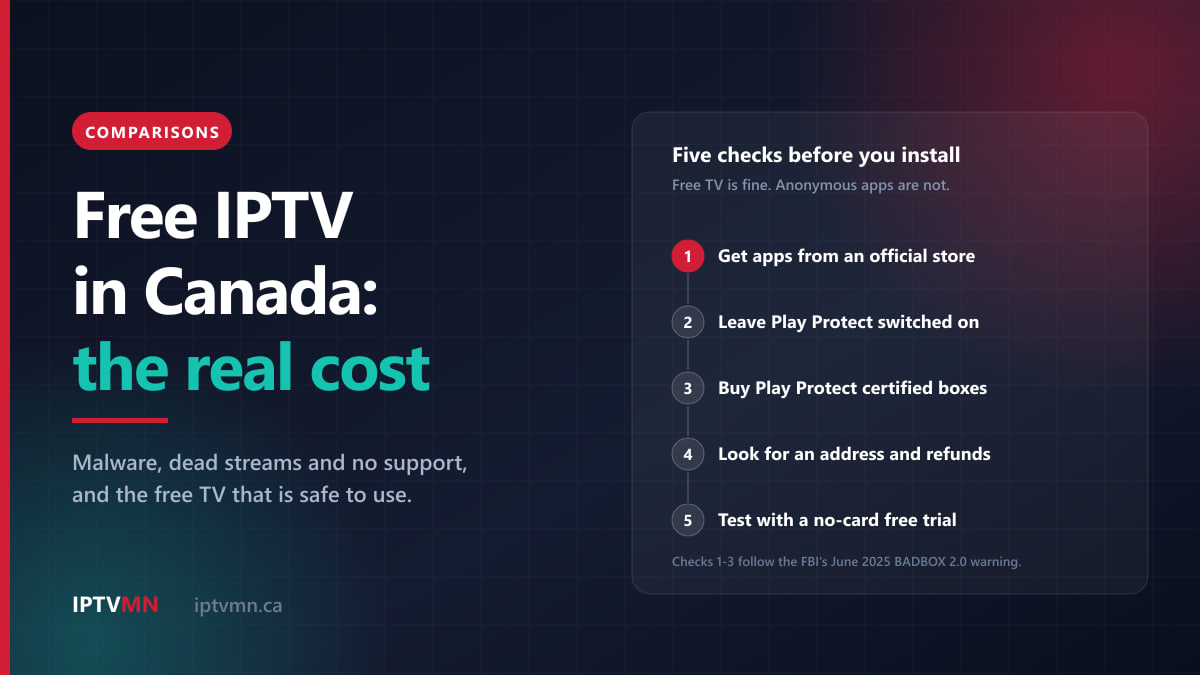
Free IPTV in Canada: Why It Costs More Than It Looks (2026)
Free IPTV in Canada costs more than it looks: malware, dead streams and no support. See which free TV is safe and how to test IPTV without paying.
Read the guide
Comparisons 14 min read
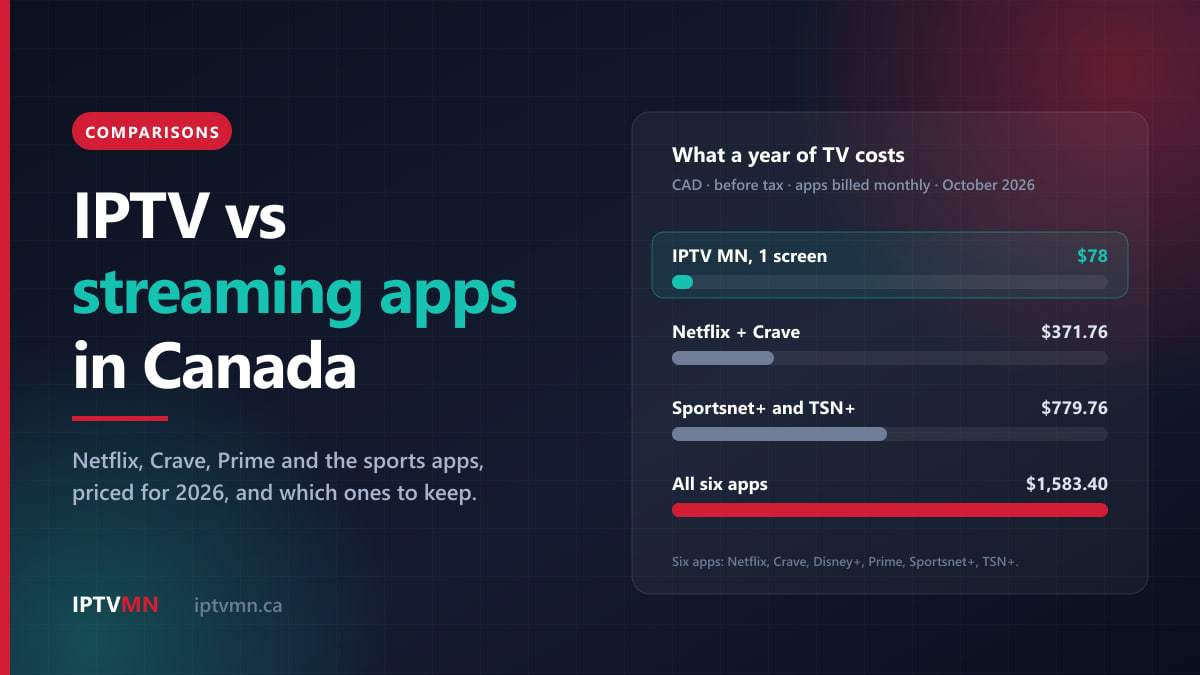
IPTV vs Netflix, Crave and Sports Apps: What You Actually Need in Canada (2026)
IPTV vs streaming apps in Canada: what Netflix, Crave, Disney+, Prime and the sports apps cost in 2026, what each does best, and which ones to keep.
Read the guide