Comparisons
TV Antenna vs IPTV in Canada: What Free Over-the-Air TV Still Gets You in 2026
A TV antenna vs IPTV in Canada: which free channels an antenna picks up, what it costs, why NHL hockey left the airwaves in 2026, and when to use both.
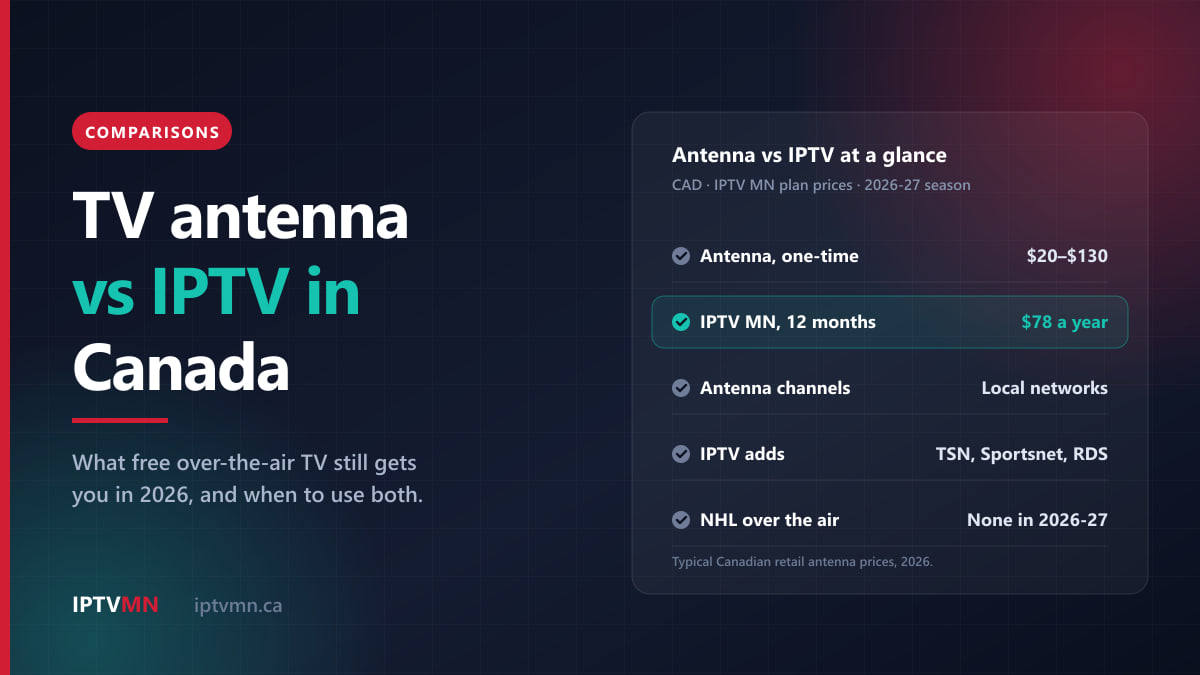
A TV antenna and IPTV solve different problems, and for many Canadian homes the best answer is both. An antenna is a one-time purchase, usually between about $20 and $130, that picks up the local networks broadcasting free over the air: CBC, CTV, Global, Citytv and ICI Radio-Canada in most large cities. IPTV is a subscription over your internet connection that adds what an antenna never carries: TSN, Sportsnet, RDS, specialty channels and international TV.
The gap between the two got wider in 2026. Since June, no NHL games air over the air at all: CBC ended its Hockey Night in Canada agreement with Sportsnet, and Rogers pulled the games from Citytv and Omni. If free Saturday hockey was the main reason you kept an antenna, that reason is gone. This guide sets out what an antenna still gets you, what it costs, where it falls short, and how to decide.
The short answer
- An antenna is the cheapest TV there is. A one-time cost of roughly $20 to $130, no monthly bill, and the local networks in HD.
- It only carries over-the-air networks. No TSN, no Sportsnet, no RDS, no specialty or international channels, and since 2026 no NHL games.
- IPTV carries the rest. IPTV MN starts at $18 for a month or $78 for a year, with TSN 1 to 5, every Sportsnet feed, RDS and a programme guide with catch-up.
- An antenna needs a tower within reach. In most cities that is easy. In rural areas far from a transmitter, it may not work at all.
- IPTV needs steady internet, about 15 to 20 Mbps per screen for Full HD.
- Using both is common and sensible. The antenna covers local news and the big free broadcasts, and keeps working when the internet is down. IPTV covers sports and everything else.
What can you watch with a TV antenna in Canada?
An antenna receives stations that broadcast free over the air and earn their money from advertising. What you get depends on where you live and how far you are from the transmitters, but in most large Canadian cities the list includes:
- CBC in English and ICI Radio-Canada Télé in French. CBC broadcasts over the air in urban centres across the country, and Radio-Canada has its own stations in several cities outside Quebec, including Toronto, Ottawa, Winnipeg, Edmonton, Vancouver and Moncton.
- CTV, and in some markets CTV2.
- Global and Citytv.
- In Quebec, TVA, Noovo and Télé-Québec as well.
- Depending on the city, multicultural and independent stations such as Omni.
In cities close to the border, such as Toronto, Windsor, Vancouver and parts of southern Quebec, an antenna often picks up American stations too, from Buffalo, Detroit, Seattle or Vermont. That can add the US networks and PBS for nothing.
Since Canada’s main stations switched to digital broadcasting in 2011, every TV sold here has a digital tuner built in. You plug the antenna into the TV’s antenna input, run a channel scan, and the stations appear. There is no box to rent and no account to create.
Picture quality is a genuine strength. Over-the-air stations broadcast in HD, at 720p or 1080i, and a strong signal looks clean. The limit is that most Canadian over-the-air broadcasts top out there: you will not get 4K from an antenna.
What an antenna does not get you
This is where the comparison usually turns. An antenna carries none of the channels that are only distributed by cable, satellite or streaming:
- No TSN or Sportsnet, which means no regional NHL games, no NBA, no MLB, most of the NFL’s TSN windows, and most of the World Juniors, which is on TSN and RDS.
- No RDS or TVA Sports outside Quebec, and no French sports coverage at all without them.
- No specialty channels: news networks like CP24 and CBC News Network, kids’ channels, documentary and lifestyle channels.
- No international channels, which matters to anyone who wants TV from home in another language.
- No catch-up and no guide history. You watch what is on now. Recording needs a separate over-the-air recorder.
The 2026 hockey change
For decades, an antenna was how many Canadians watched the NHL for free: Hockey Night in Canada on CBC every Saturday, plus games on Citytv and Omni. That ended on June 16, 2026, when CBC stopped sublicensing NHL games from Sportsnet and Rogers withdrew the games from its own over-the-air stations. The national Saturday games now air on Sportsnet, and every NHL game this season is on a subscription channel.
The Hockey Night in Canada name stays on CBC, which plans to use it for Professional Women’s Hockey League games from December, on a reduced schedule. That is free over the air and worth knowing about. For the men’s game, our NHL 2026-27 TV guide sets out which channel carries which team.
What still airs free with an antenna in 2026-27
Big events are where an antenna still earns its place. These are the ones that air on conventional networks, which means an antenna picks them up in most cities:
| Event | Network | Free with an antenna? |
|---|---|---|
| Super Bowl LXI, February 14, 2027 | CTV (and TSN, RDS) | Yes, on CTV |
| Grey Cup, each November | CTV (and TSN, RDS) | Yes, on CTV |
| Grand Slam of Curling, Saturday playoffs | CBC | Yes |
| Canadian Grand Prix (F1) | CTV and Noovo | Yes, once a year |
| PWHL under the Hockey Night name, from December | CBC | Yes, reduced schedule |
| NHL regular season and playoffs | Sportsnet, TSN, Prime Video | No |
| World Juniors, December 26 to January 5 | TSN and RDS | No |
The pattern is clear. One-off finals and championship weekends often stay on free TV, while regular seasons have moved behind subscriptions. An antenna covers the first group well. Our guides to the World Juniors and the NHL season cover the second.
How much does an antenna really cost?
Less than a single month of most TV packages. Typical prices at Canadian retailers in 2026:
| Type | Typical price | Suits |
|---|---|---|
| Indoor, flat or amplified | About $20 to $75 | Homes in the city, within roughly 25 to 40 km of the towers |
| Indoor/outdoor amplified | About $40 to $100 | Suburbs, or a window that faces away from the towers |
| Outdoor or attic | About $90 to $130 | Rural homes, long distances, metal roofs or basements |
Two things push the real cost up. A rooftop or mast installation by someone else adds labour, and an over-the-air recorder, if you want to record, is a separate purchase. Even so, an antenna pays for itself within the first month or two compared with any paid TV.
Range figures on the box are a ceiling, not a promise. A 100 km rating assumes an open path with nothing in the way. Hills, tall buildings, a metal roof, a basement and, in summer, trees full of leaves all shorten it. Before buying, look up your address on a signal-prediction site such as TV Fool, which covers Canada, to see how far the towers are and in which direction. If the strongest stations are more than about 50 km away, plan for an outdoor antenna.
How do you set up an antenna for the best reception?
Most disappointing antenna results come from placement, not from the antenna. Ten minutes spent on these steps usually makes the difference between four channels and fourteen:
- Find the towers first. Look up your address on a signal-prediction site to see where the transmitters are, how far away, and in which direction. In most cities they sit in one cluster, which makes aiming simple.
- Go high and face the towers. Put an indoor antenna on the wall or in the window closest to the towers, as high as the cable allows. An upstairs window beats a basement, and a window beats an inside wall.
- Keep it away from metal and electronics. Metal window frames, foil-backed insulation, a fridge or a router right next to the antenna can all block or disturb the signal.
- Run the channel scan, then move and scan again. Most TVs keep only the channels they find on the last scan. Try two or three spots, scan each time, and keep the one that finds the most stations.
- Use an amplifier only when you need one. A built-in amplifier helps with long cable runs, a splitter feeding several TVs, or towers far away. Close to the towers it can overload the tuner and lose channels, so try it switched off as well.
- Rescan every few months. Stations occasionally change frequency. If a channel disappears, run the scan again before blaming the antenna.
If you want to record from the antenna, you need an over-the-air recorder, a separate box with its own hard drive or storage. IPTV handles the same job differently: the programme guide’s catch-up lets you go back to programmes that have already started or aired recently, on channels that offer it, with nothing to set up. Our guide to the IPTV TV guide and catch-up explains how that works.
TV antenna vs IPTV: the full comparison
Here is how the two compare on what matters day to day. The IPTV column uses IPTV MN’s plans; the pricing page lists them all.
| TV antenna | IPTV | |
|---|---|---|
| Cost | About $20 to $130, once | From $18 for a month, or $78 a year |
| Channels | Local over-the-air networks only | Over 54,000, including TSN 1 to 5, Sportsnet, RDS and international |
| NHL in 2026-27 | None | National and regional feeds |
| Picture | HD, 720p or 1080i | HD and Full HD, 4K where the source is 4K |
| Needs internet | No | Yes, about 15 to 20 Mbps per screen |
| Catch-up and guide | Basic now-and-next only | Full programme guide with catch-up |
| Works away from home | No | Yes, on any internet connection |
| Weather | Can break up in storms or high wind | Not affected |
Where the antenna wins
- Price. Nothing beats free once it is paid for.
- No internet needed. If your internet goes down but the power stays on, the antenna keeps working. That makes it a sensible backup for news during a storm.
- No account, no renewal. It never expires and never asks for a password.
- Reliable big events. The Super Bowl and the Grey Cup on CTV arrive without depending on your router.
Where IPTV wins
- Sports. Every regional NHL game, the Raptors, the Blue Jays, the World Juniors and the NFL’s TSN windows all need TSN or Sportsnet.
- Choice. Specialty, news and international channels, plus a large on-demand library.
- French outside Quebec. RDS, TVA Sports and TVA are not over the air outside Quebec.
- Flexibility. Catch-up, several screens at once and the same login when you travel.
- Reception. No towers to aim at. If your internet is steady, the picture does not depend on your street or the weather.
What each setup costs over a year
Spread over twelve months, the difference between the three routes is large. Using typical figures:
| Setup | First year | Every year after |
|---|---|---|
| Antenna only | About $20 to $130 | $0 |
| Antenna plus IPTV MN, one connection | About $98 to $208 | $78 |
| A typical cable or fibre TV package | About $1,020 to $1,560 | The same, or more once promotions end |
The cable figure assumes the $85 to $130 a month most mid-tier Canadian packages cost once the introductory price ends, before receiver rentals. Even the most expensive antenna plus a year of IPTV costs a fraction of one year of cable, and from the second year the antenna costs nothing at all. That is why “antenna for local channels, a subscription for the rest” has become the default plan for so many Canadian households that cut the cord.
Can you use an antenna and IPTV together?
Yes, and it is one of the most practical setups in Canada. The two use different inputs on the same TV. The antenna goes into the coaxial antenna input, and a streaming device for IPTV goes into an HDMI port. You switch with the remote’s input button. On many smart TVs, the over-the-air channels can even sit in the TV’s own channel list next to your apps.
A typical split looks like this:
- Antenna: local news, CBC, CTV and Global evening programmes, and big free events.
- IPTV: TSN, Sportsnet, RDS, specialty channels and anything you want to restart or catch up on.
Because the antenna covers local channels for nothing, a single IPTV connection is usually enough for the main TV. If two people want different subscription channels at the same time, add a second connection instead of a second TV package. IPTV MN’s plans come with one, two or three connections at every length.
To set up the IPTV side, the installation guides cover every common device. A Fire TV Stick is a common choice, but check the guide first, because the newest Amazon sticks run Vega OS and cannot install outside apps. Many recent Samsung smart TVs need no extra device at all.
Who should choose which?
An antenna alone is enough if you mostly watch local news and network shows, you are not a regular-season sports fan, and you live within reach of the towers. That is a real group of viewers, and paying for more would waste money.
IPTV alone makes sense if you are far from any transmitter, you watch mainly sports or specialty channels, or you move between homes and want the same lineup everywhere.
Both make sense if you want the most for the least: the antenna for free local TV and as a backup when the internet is down, IPTV for sports and everything else.
Neither, yet, if your internet is slow and you are also out of antenna range. Satellite is still the answer for homes with no usable broadband and no towers nearby.
Five Canadian households
A retired couple in Ottawa. They watch the CTV and CBC news, a few network dramas and the Super Bowl. An indoor antenna in a south-facing window picks up everything they want. Verdict: antenna only. See IPTV in Ottawa for what else is available if their habits change.
A hockey family in Winnipeg. They want every Jets game, and since June none of them is free over the air. Verdict: IPTV for the regional feeds, plus an antenna for local news and the Grey Cup. See IPTV in Winnipeg.
A farm 90 km from Saskatoon. The towers are too far for an indoor antenna, and an outdoor one picks up two stations on a good day. They have Starlink. Verdict: IPTV. Our guide to IPTV on Starlink and rural internet covers the settings that help. See IPTV in Saskatoon.
A condo in Toronto. A flat antenna on the balcony door picks up the Canadian networks and several Buffalo stations. They want TSN for the Leafs and the World Juniors. Verdict: both. See IPTV in Toronto.
A francophone family in Vancouver. The antenna gets ICI Radio-Canada Télé, but nothing else in French. They want TVA and RDS for hockey in French. Verdict: antenna for Radio-Canada, IPTV for the rest. Our guide to French TV across Canada covers what is available where. See IPTV in Vancouver.
What about free streaming apps and “free IPTV”?
There are legitimate free options beyond the antenna: CBC Gem, ICI TOU.TV and free ad-supported channel apps built into many smart TVs. They pair well with an antenna.
What is not free is the box or app promising every paid channel for nothing. Those services tend to disappear without warning, and some come on devices that carry malware. Our article on the real cost of free IPTV explains the risks and how to spot them.
On the legal side, the technology behind IPTV is legal, and it is what Canadian carriers use for their own TV products. What matters is the licensing of the content a service carries. IPTV MN supplies network access and reseller services and does not host, record or broadcast any media; subscribers are responsible for complying with the Copyright Act and the Broadcasting Act. The full position is in our disclaimer, and our page on what IPTV is explains how it works.
Frequently asked questions
What channels can I get with an antenna in Canada?
In most large cities, CBC, ICI Radio-Canada Télé, CTV, Global and Citytv, with TVA, Noovo and Télé-Québec in Quebec and multicultural stations such as Omni in some markets. Near the border you may also get American stations. What you actually receive depends on your distance from the towers and what is in the way.
Is NHL hockey on free TV in Canada this season?
No. Since June 2026, CBC no longer airs NHL games and Rogers has withdrawn them from Citytv and Omni, so every NHL game is on a subscription channel such as Sportsnet, TSN or Prime Video. CBC plans to air PWHL women’s hockey under the Hockey Night in Canada name from December.
Do I need a special TV for an antenna?
No. Every TV sold in Canada since the switch to digital broadcasting in 2011 has a digital tuner built in. Plug the antenna into the antenna input and run a channel scan from the TV’s settings. Very old TVs need a small converter box.
How far from the tower can an antenna work?
An indoor antenna usually works within about 25 to 40 km of the towers, and outdoor antennas are rated for 100 km or more on an open path. Hills, buildings, metal roofs and trees shorten the real range. Check your address on a signal-prediction site before buying.
Can I use an antenna and IPTV on the same TV?
Yes. The antenna goes into the TV’s antenna input and the IPTV streaming device into an HDMI port, and you switch with the input button. Many households use the antenna for local channels and IPTV for sports and specialty channels.
Which works during an outage?
If the internet is down but the power is on, an antenna keeps working and IPTV does not. If the power is out, neither works unless the TV has backup power. That makes an antenna a useful, cheap backup for local news.
The bottom line
An antenna is still the best value in Canadian TV for local news, network shows and the big free events like the Super Bowl and the Grey Cup. Since 2026, though, it no longer gets you any NHL hockey, and it never carried TSN, Sportsnet, RDS or specialty channels.
If you live near the towers, start with an antenna and see whether it covers what you watch. If it does not, add IPTV for the rest instead of a full TV package. The free 24-hour trial lets you test it on your own TV and internet, the channel list shows exactly what is included, and live support can help if your setup needs advice. Our page on the best IPTV in Canada sets out what to expect from any provider before you pay.
Written by the IPTV MN team
We run the servers in Toronto and Montreal and answer the support messages. Everything here comes from what we see on the network and what Canadian members actually ask us. Something unclear or out of date? Tell us and we will fix it.
Keep reading
Comparisons 13 min read
How to Watch the 2027 World Juniors in Canada: Schedule, Start Times and Every Option Compared
Canada's 2027 World Juniors schedule in Edmonton, start times for every province, and every way to watch on TSN, its app, RDS or IPTV, compared on cost.
Read the guide
Comparisons 17 min read
How to Get the Best Picture From IPTV on Your TV: The Settings That Matter (2026)
Better IPTV picture quality in minutes: the right picture mode, motion smoothing, 4K and HDR settings on Samsung, LG, Fire TV and Apple TV, explained plainly.
Read the guide
Comparisons 15 min read
Starting an IPTV Reseller Business in Canada: Credits, Pricing and Support (2026)
Thinking of becoming an IPTV reseller in Canada? How credits work, real margin maths from current prices, what to charge, and the support customers expect.
Read the guide